
Plan using AI Image Classifier
Metal empowers the seamless integration of Extract, Transform, Load (ETL) processes with Artificial Intelligence (AI). This synergy is achieved through predefined AI Engines, as detailed in the AI Engines documentation.
ℹ️ INFO
Presently, Metal Server exclusively supports read operations with Plan tables.
Prerequisites
Before experimenting with this use case, ensure the deployment and readiness of the sample project. Refer to the Sample project documentation for guidance.
Presentation
Imagine having a dataset of images that require classification using the TensorFlowJS engine.
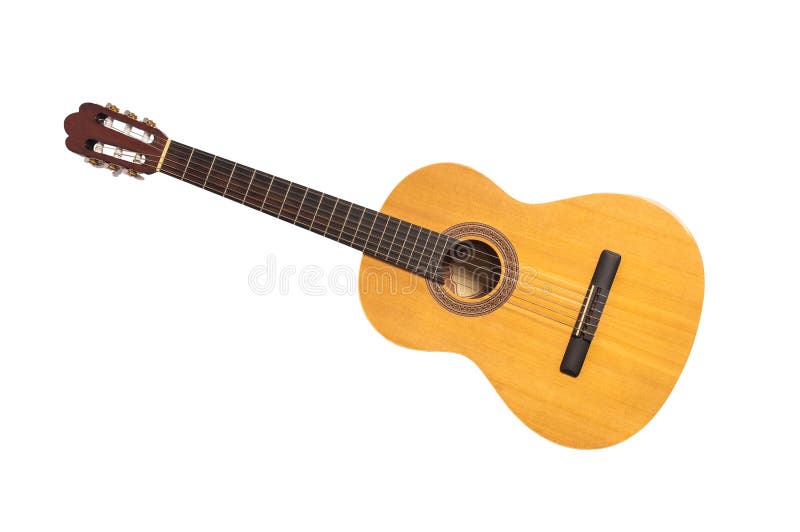
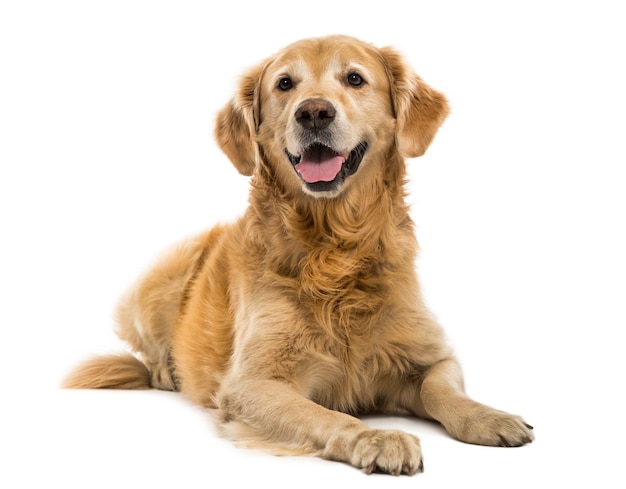
The goal is to configure a plan that classifies these images and exposes the rendered data through an HTTP API.
Configuration
Begin with a minimal Metal configuration file, config.yml:
version: "0.3"
server:
  port: 3000
  authentication:
    type: local
    default-role: all
  request-limit: 100mb
In this configuration:
- Set the Metal server port to 3000/TCP with
port: 3000 - Enable authentication with
authentication: - Limit the maximum response size to 100 Mbytes with
request-limit: 100mb
Add a users section with the user myapiuser:
roles:
  all: crudla
users:
  myapiuser:
	  password: myStr@ngpa$$w0rd
In the ai-engines section, declare an AI engine named img-class:
ai-engines:
  img-class:
    engine: tensorflowjs
    model: image-classify
Here, we:
- Create a new instance
img-classusingtensorflowjsas an engine - Use the model
image-classifyfor image classification
Configure the plans section with the plan p-image-classify containing an entity named img2class that inserts fake data and runs the declared AI engine:
plans:
  p-image-classify:
    img2class:
      - insert:
          data:
            - img: https://thumbs.dreamstime.com/b/isolated-classical-guitar-photo-png-format-available-full-transparent-background-54363220.jpg
            - img: https://img.freepik.com/premium-photo/golden-retriever-lying-panting-isolated-white_191971-16974.jpg
            - img: https://encrypted-tbn0.gstatic.com/images?q=tbn:ANd9GcTPpDgjJjrakUj3VlDC0K6XtdCRu5TK7CPXr7QHVjiL&s
      - run:
          ai: img-class
          input: img
          output:
class: class| Step Command | Block |
|---|---|
- insert: | Inserts the images in the plan data |
- run: | Runs AI img-class on the img field and creates a new field (class) for the AI output |
ℹ️ INFO
For more information about using plans, please refer to: Configuration File Reference (Section Plans).
Add the source plan-image-classify to the sources section, pointing to the plan p-image-classify:
sources:
plan-image-classify:
provider: plan
database: p-image-classifyTo expose the plan through an HTTP API, include a schemas section with the schema aiplan pointing to the source plan-image-classify:
schemas:
aiplan:
source: plan-image-classifyThe final configuration will be:
version: "0.3"
server:
port: 3000
authentication:
type: local
default-role: all
request-limit: 100mb
roles:
all: crudla
users:
myapiuser:
password: myStr@ngpa$$w0rd
sources:
plan-image-classify:
provider: plan
database: p-image-classify
schemas:
aiplan:
source: plan-image-classify
ai-engines:
img-class:
engine: tensorflowjs
model: image-classify
plans:
p-image-classify:
img2class:
- insert:
data:
- img: https://thumbs.dreamstime.com/b/isolated-classical-guitar-photo-png-format-available-full-transparent-background-54363220.jpg
- img: https://img.freepik.com/premium-photo/golden-retriever-lying-panting-isolated-white_191971-16974.jpg
- img: https://encrypted-tbn0.gstatic.com/images?q=tbn:ANd9GcTPpDgjJjrakUj3VlDC0K6XtdCRu5TK7CPXr7QHVjiL&s
- run:
    ai: img-class
    input: img
    output:
class: classWith the configuration set, restart the Metal server:
docker compose restart metalPlaying with the HTTP API
To test the HTTP API, begin by logging in:
curl --request POST \
  --url http://localhost:3000/user/login \
  --header 'content-type: application/json' \
  --data '{"username":"myapiuser","password": "myStr@ngpa$$w0rd"}'
You should receive a response with a token:
{
  "token":"eyJhbGciOiJIUzI1NiIsInR5cCI6IkpXVCJ9.eyJ1c2VybmFtZSI6Im15YXBpdXNlciIsImlhdCI6MTcwNTA1NjMzOCwiZXhwIjoxNzA1MDU5OTM4fQ._ugUqb3BfQRWe0xYqFbvIzmlBrKMXf5EYws9aWozsaE"
}
Then, select data from the "img2class" table using the provided token after the "Bearer" prefix:
curl --request GET \
  --url http://localhost:3000/schema/aiplan/img2class \
  --header 'authorization: Bearer eyJhbGciOiJIUzI1NiIsInR5cCI6IkpXVCJ9.eyJ1c2VybmFtZSI6Im15YXBpdXNlciIsImlhdCI6MTcwNTA1NjMzOCwiZXhwIjoxNzA1MDU5OTM4fQ._ugUqb3BfQRWe0xYqFbvIzmlBrKMXf5EYws9aWozsaE' \
  --header 'content-type: application/json'
You should receive a response showing rows with the img field and a new field class containing the classification of each image:
{
  "schema": "aiplan",
  "entity": "img2class",
  "status": 200,
  "metadata": {},
  "fields": {
    "img": "string",
    "class": "object"
  },
  "rows": [
    {
      "img": "https://thumbs.dreamstime.com/b/isolated-classical-guitar-photo-png-format-available-full-transparent-background-54363220.jpg",
      "class": [
        {
          "className": "screw",
          "probability": 0.6480134725570679
        },
        {
          "className": "acoustic guitar",
          "probability": 0.31899121403694153
        },
        {
          "className": "electric guitar",
          "probability": 0.014988371171057224
        }
      ]
    },
    {
      "img": "https://img.freepik.com/premium-photo/golden-retriever-lying-panting-isolated-white_191971-16974.jpg",
      "class": [
        {
          "className": "golden retriever",
          "probability": 0.9861685633659363
        },
        {
          "className": "Labrador retriever",
          "probability": 0.009661964140832424
        },
        {
          "className": "Sussex spaniel",
          "probability": 0.0011867072898894548
        }
      ]
    },
    {
      "img": "https://encrypted-tbn0.gstatic.com/images?q=tbn:ANd9GcTPpDgjJjrakUj3VlDC0K6XtdCRu5TK7CPXr7QHVjiL&s",
      "class": [
        {
          "className": "sports car, sport car",
          "probability": 0.23274612426757812
        },
        {
          "className": "convertible",
          "probability": 0.17254509031772614
        },
        {
          "className": "pickup, pickup truck",
          "probability": 0.16245432198047638
        }
      ]
    }
  ]
}
Feel free to explore and interact with the HTTP API using the provided example.
For additional details and comprehensive information, please consult the API documentation.